
Roja
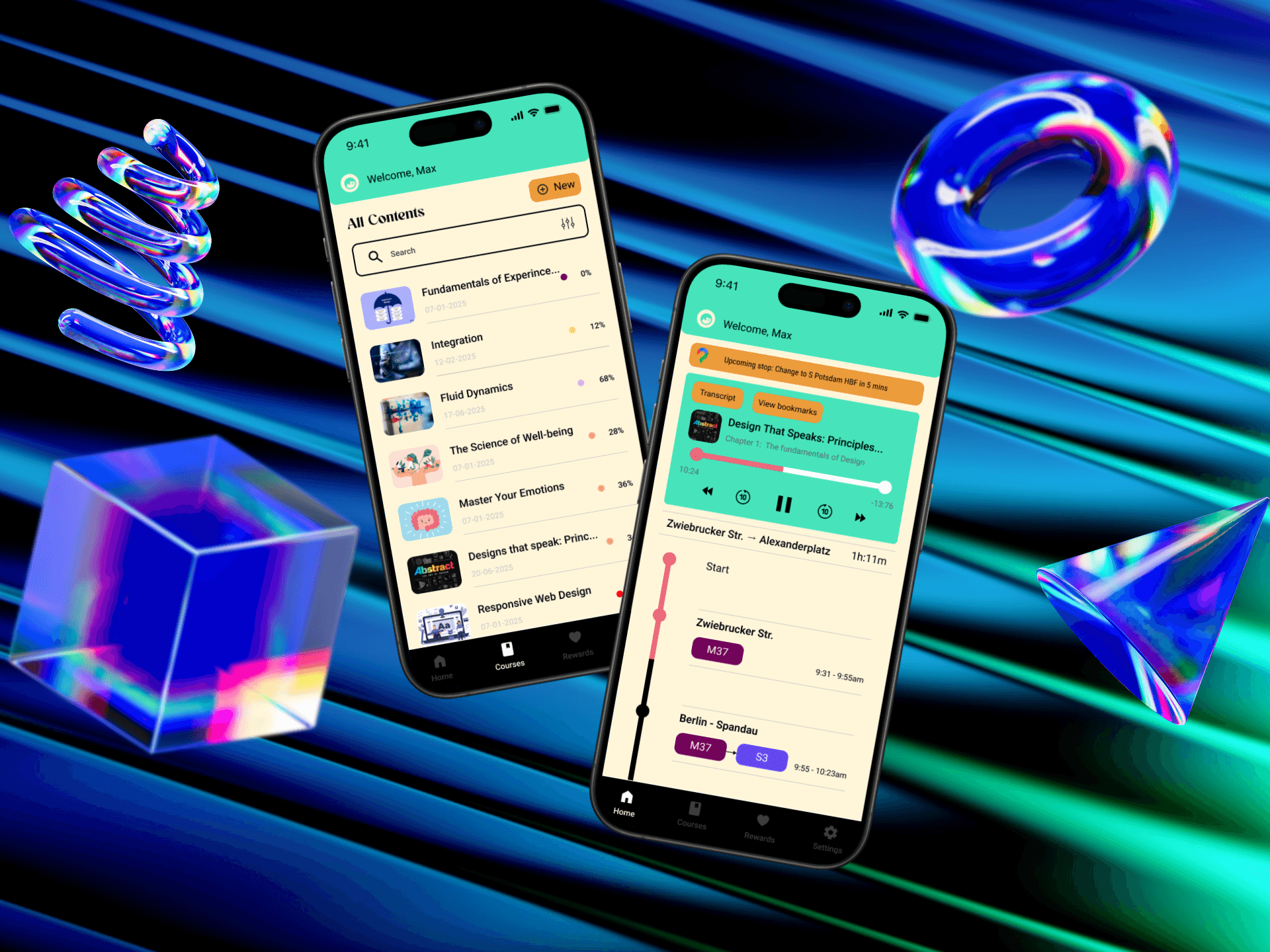
Roja pairs voice-narrated courses with live navigation alerts, so commuters can keep learning without missing their stop. Built with Pooja Bas over a semester at UE Germany. The problem: willpower alone doesn't sustain learning habits. The fix: nudges at the right moment instead.
Timeline
Apr 2025 - Jul 2025
Role
Mobile UI/UX Designer
Project
Master’s Project
Collaborators
Pooja Bas

Overview
The idea
Learn on your commute without the fear of missing your stop.
Grade
91/100
UX Design course, UE Germany.
Iterations
5 rounds
On the Home screen before the final design.
Deliverables
A commute-aware learning app. A working Figma prototype.
Problem
Willpower isn't a system you can design around.
That tension is the real problem: commuters want to use dead time to learn, but staying alert for their stop competes directly with focus. Pooja and I traced this through lotus blossom and future cone exercises at UE Germany, refining it further after our professor reshuffled groups mid-project and handed us someone else's starting point.

The problem
How might we redesign digital engagement patterns so that time spent on devices naturally contributes to personal or professional growth, without relying solely on user willpower?
Research
Every learning app solved the content problem. None solved the moment.
We mapped problems, users, needs and competitors on Miro. Raeva AI and Turbolearn AI both turn documents into study material, but both assume you're sitting still with full attention. Nobody was designing for the forty minutes people actually have.
What the research turned up
Compiled from our Miro lotus blossom. The full board sits behind the expander below.
What we found people were actually struggling with.
Vision
A digital environment with a reward system where students actively engage with their learning material instead of scrolling past it.
Mission
Turn a student's own content into a personalised study experience that encourages consistent, focused learning.
What the research revealed

User Persona
Max has 40 minutes a day and can't use them.
Max
32, Berlin. IT professional. Ambitious, and usually overwhelmed.
His commute is the only window he has for learning. It never works out. He either gets absorbed and nearly misses his stop, or stays too anxious about missing it to focus. By evening he's too drained to start, so he scrolls instead.
What he wants
- →Learn without it feeling like another task
- →Get told about his stop without staying alert for it
- →Listen instead of read
- →Spend less time looking at a screen
What gets in the way
- ×Learning tools assume time he doesn't have
- ×Too drained after work, so he scrolls instead
- ×Studying on the train is either too absorbing or too stressful
- ×Reminders either nag him or never arrive
Solution
Let the app watch the route so the user doesn't have to.
If the app tracks the journey, the user can stop tracking it. Everything else followed from that:

Mapping where the commute actually breaks down.
Four phases (setting goals, planning, use, loyalty & advocacy) track Max's mood throughout. It pinpoints where his anxiety spikes (missing a stop) and where motivation peaks (streak progress), which is exactly what notifications and rewards address.
Max's mood across the journey
Two moments decided the design. The dip is where he doubts the app is real learning. The peak is where streaks and redeemable rewards land. Hover any point to read his thought at that step.
Weighs it up
How many points do I get per task? Is it worth my time to start this now?
Answered by: Goal-linked rewards
Doubts it
This is like a feed. I hope it isn't another fake learning app like the ones I've tried.
Answered by: Non-distracting UI, real course structure
Hooked
Seeing my streak increase and getting rewards like redeemable coffee is really satisfying.
Answered by: Streaks and redeemable rewards
The flow splits into four branches from Home:
Four branches, one commute
Home carries the whole commute loop, from picking a course to being told the stop is coming. Everything else stays shallow on purpose, so nothing competes for attention while the train is moving.
Home
The commute screen
Courses
Library and structure
Rewards
Streaks and redemption
Settings
Scoped, not specified
Cozy and intellectual, with a playful edge.
Direction: "cozy and intellectual." Warm, minimal references (books, soft light, quiet architecture) paired with vivid UI accents, so the app feels calm but not flat.
Cozy and intellectual
We went through several palettes before settling here. The references pointed at warm, quiet surfaces with vivid accents, so the app could feel calm to sit with but still signal clearly when something needs attention.
Palette
Type
Keep learning
Meditative · headings and numbers
Course text runs long and gets read in motion, so body copy stays at a generous size with open line height and no decorative weight.
Roboto · body, labels and UI
What the references decided
Calm base, vivid signals
Colour is reserved for things that need a response. The rest of the interface stays quiet so an alert actually reads as one.
Warm, not clinical
Cream text on deep violet rather than white on grey. The app is used in dead time, so it should feel closer to a book than a dashboard.
Playful in small doses
Rounded shapes and reward moments carry the personality. Course content stays plain and unstyled.
Ruled out
Pure gamification
Points and badges everywhere made it read as a game rather than a study tool.
Light, minimal, greyscale
Clean, but indistinguishable from every other learning app, and harsh on a dark commute.
Heavy illustration
Slowed the interface down and competed with the course content for attention.
Wireframes/Iterations
Eight screens, one folded page.
Our professor set a paper-fold exercise: fold one sheet into 8 screens, fill them all under a time limit. Fast, forced decisions on what actually mattered: dashboard, route markers, streak calendar, settings.


Iterating on the flow, not just the screens.
Many rounds of implementing, getting feedback, and revisiting. We walked through real scenarios so every button and flow made sense, not just looked right.
Five rounds on one screen
The Home screen carried the whole concept, so it took the most revision. Each round is here with what changed and the reason behind it.

01 of 05
A journey that wasn't a real journey
What changed
The course ran down the screen as a path, with chapters branching off it. Two search fields sat on top, one for a destination and one for a course.
Why
It looked like navigation but carried no real route data, so it could never actually tell Max when his stop was coming.
Implementation
The final prototype.
The final prototype: a music-player-style course screen with route alerts layered in, a rewards system tied to real streak progress, and a sectioned courses page.

Navigation to learning.
The courses page with user uploaded content.
Uploading user content flow.
Rewards and streak page.

Results
Takeaways
What I'd do next, and what this prototype can't do.
More Projects
